Supply-chain security
In this lab, you will examine the security posture of a Kubernetes deployment by examining different security configuration.
Several categories will be inspected, including container security, security contexts, service exposure, access control, secrets, and network policies.
Ultimately, the objective will be to measure the overall security of the configuration by retrieving potential attack paths.
Step 0 - Download the Helm Chart
Helm is the package manager of choice for Kubernetes, and Charts consist of deployment-ready collections of YAML manifest files that describe the model for deploying the microservice application containers to Kubernetes.
You can first click on the second tab of Lab 5, where you will be downloading an Helm Chart called spring-cloud-dataflow.yaml.
This application enables to deploy Spring Cloud Data Flow (SCDF), which is a cloud-native orchestration tool for data pipelines. It allows one to define, deploy, and manage streaming and batch data processing applications using Spring Boot and Spring Cloud technologies.
You will find some key components in the Helm Chart, including:
- Data Flow Server: The core component responsible for managing pipelines.
- Skipper Server: Handles the deployment of streaming applications.
- Database: Typically uses MySQL to store metadata.
- Message broker: Uses RabbitMQ for event-driven data processing.
- Metrics & monitoring : Integration with Prometheus.
Step 1 - Inspect the application
Pods
Pods are the smallest deployable units in Kubernetes, consisting of one or more containers that share storage and network resources. Workload controllers such as Deployments, StatefulSets, and DaemonSets manage these resources. More details can be found in the Kubernetes documentation.
Question 1
Identify all Pods deployed by the Helm chart (e.g., Deployment, StatefulSet), including those managed by workload resources.
Document their names and the type of controller managing them.
Containers
Each Pod contains one or more containers, which are the runnable instances of your application or service. In our case, we will only consider "containers" and not the "initContainers".
Question 2
Determine the total number of containers across all identified Pods.
List the number and names of the containers in each Pod.
Service and Accessibility
Services in Kubernetes define how Pods are exposed within or outside the cluster.
Question 3
Map Services to Pods by identifying the Service associated with each Pod.
Specify the Service type (e.g., ClusterIP, NodePort, LoadBalancer) for each Pod.
Service accounts, roles, and role bindings
Kubernetes uses Service Accounts, Roles, and RoleBindings to manage permissions and access controls within the cluster.
Question 4
List all service accounts defined in the configuration.
For each, provide its name and the associated Pod.
Question 5
List all roles in the configuration.
Specify their names and the allowed actions (verbs + resources).
Question 6
List all role bindings in the configuration.
Document their names, the associated ServiceAccount, and the linked Role.
Network policies
Network Policies control the communication between Pods within the cluster.
Question 7
List all defined Network Policies.
For each, specify each Pod and its assigned rules (e.g., allowed connections and ports).
Secrets
Secrets store sensitive information like passwords, tokens, or keys.
Question 8a
Identify any Secrets utilized by the Helm Chart.
Step 2 - Individual security configurations
Container security
Containers should use minimal, trusted images to reduce vulnerabilities.
We will select one individual container extracted from the configuration:
containers:
    - name: rabbitmq
        image: docker.io/bitnami/rabbitmq:4.2.1
        imagePullPolicy: "IfNotPresent"
        securityContext:
            allowPrivilegeEscalation: false
            capabilities:
                drop:
                - ALL
            readOnlyRootFilesystem: true
            runAsGroup: 1001
            runAsNonRoot: true
            runAsUser: 1001
            seLinuxOptions: {}
            seccompProfile:
                type: RuntimeDefault
First install the Trivy container vulnerability scanner tool:
Scan the container for vulnerabilities:
Question 8b
Identify the number of high or critical vulnerabilities found.
Choose one CVE among them and describe it in more details.
Security context
The Security Context defines privilege levels and access controls for Pods and containers.
Question 9
Looking at the same container description, answer the following questions: a) Can the container run as root? b) Can it elevates its privileges? c) Which Linux capabilities is the container granted? d) Can the container write to files? e) Is an AppArmor profile applied? If so, what does it enforce? f) Is a Seccomp profile applied? If so, what does it enforce?
Exposure
Limiting the exposure of services minimizes potential entry points for attackers.
Question 10
Examine the deployed Services and identify if there is any with excessive exposure.
Role-Based Access Control
Question 11
Which Role grants the most extensive permissions?
To which Pod is it associated?
Network Policies
Question 12
Looking to the network policy of that given Pod, explain how it can be accessed from other Pods of the cluster.
Secrets
Question 13
Are any Secrets hardcoded within the chart? How securely are they managed?
Step 3 - Potential attack paths
The MITRE Adversarial Tactics, Techniques and Common Knowledge (ATT&CK) framework is an up-to-date database of attack techniques grouped by objectives known as tactics.
The ATT&CK framework, originally generic, has been specialised for Kubernetes, highlighting multi-stage cyber-attack patterns and techniques that attackers can use to infiltrate and perform damage on Kubernetes clusters. The threat matrix is made up of nine distinct families of tactics that an attacker can combine to reconstruct and exploit possible attack paths.
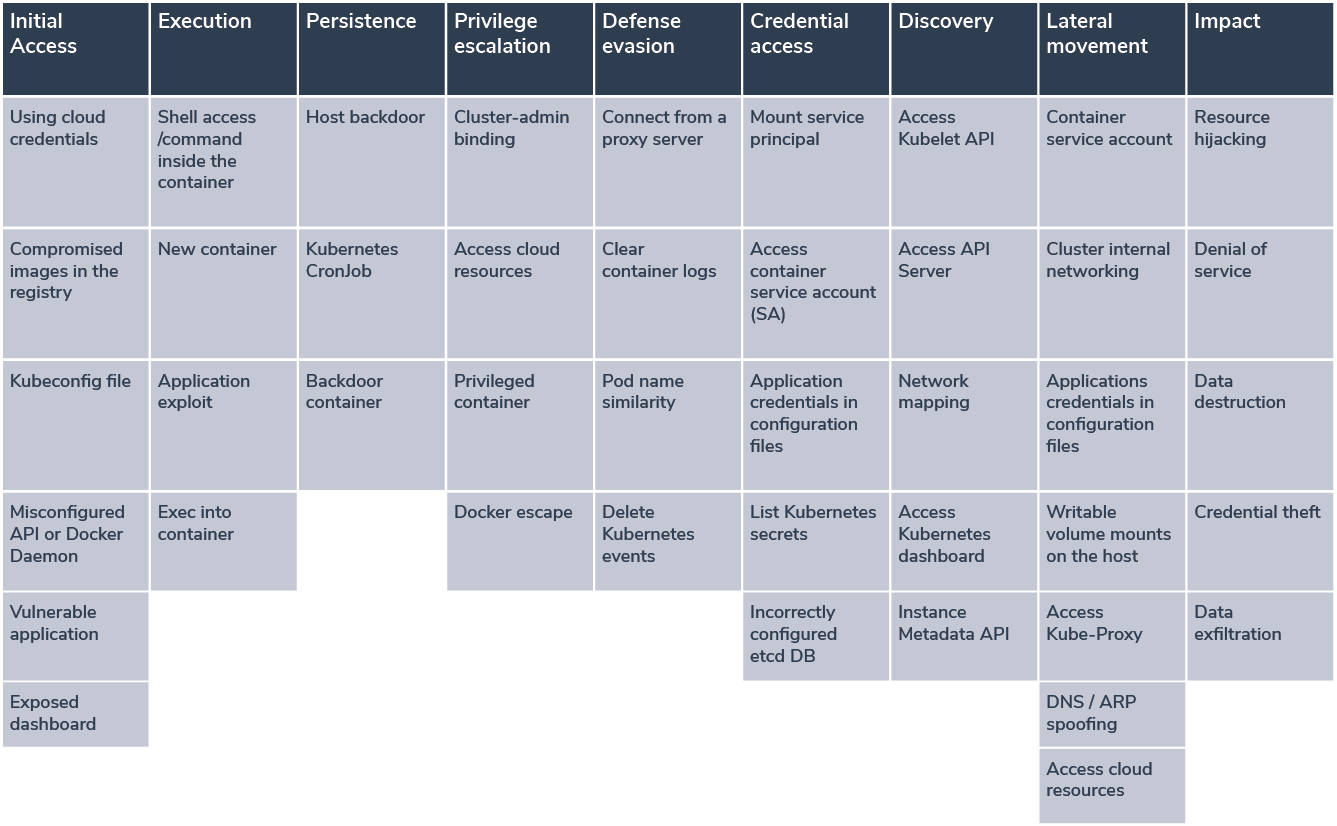
Question 14
Using the ATT&CK framework, describe a possible attack path based on your findings:
Initial Access: Could vulnerabilities in a container provide an entry point?
Privilege escalation: Does the security context allow privilege elevation?
Credential access: Are any hardcoded Secrets vulnerable?
Discovery: Can an attacker list Pods or Deployments based on Role permissions?
Lateral movement: Do Network Policies restrict unauthorized access?
Impact: Could resource hijacking or denial-of-service attacks be mitigated by PodDisruptionBudgets?